

Free professional mixing software
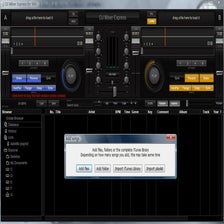
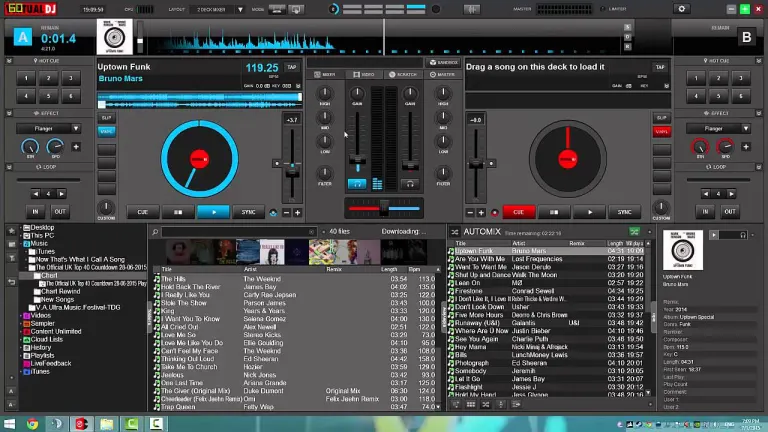
VirtualDJ is a Digital Audio Workstation (DAW) and virtual mixer software for DJs. It can be used to curate and edit songs and playlists for events, and is filled to the brim with different layouts, modes, live streaming features, and personalization options. Similar to music software like Serato or Ableton, Virtual DJ narrows the space between music and audience, leaving the DJ all the necessary tools to fill the gap.
Easy to pick up but difficult to master, VirtualDJ has a largely intuitive interface that makes it easy to start, switch, and combine various tracks to great effect. Once a track is engaged, the software’s plug-and-play auto-detection makes it the ideal DJ software for making use of connected controllers and mixers. The free version of VirtualDJ can be downloaded for Windows 7 and later, or on Mac devices as well.
Become a DJ with this industry standard
Some of VirtualDJ’s components are harder to pick up than others. With enough poking, prodding, and consulting FAQ pages, you will be able to use the software to manipulate audio in whatever you need. It conveniently covers the bases with its fundamental tools, such as controller integration and real-time volume mixing. Other features, such as syncing tracks to a common tempo, are buried behind menus.
Similar to Ableton, VirtualDJ prioritizes professionally live streaming music (thus the name) over composition and recording. For would-be composers and arrangers, there are more efficient options, such as FL Studio or Cubase. While it may not be immediately intuitive, VirtualDJ also has an event schedule option that assists in synchronizing music, videos, and images. This impressive array of visuals enhances the performance experience, furthering creative control beyond just tweaking and modifying audio tracks on the spot.
The visual features of VirtualDJ is unique and sets it apart from other software of the same ilk. It’s especially helpful to DJs who are tasked with being the center of attention and keeping the room entertained. It saves you from having to download music videos in advance, and provides a decent variety of visual options to complement whichever track is playing. The visuals can even react to the beat and frequency of the audio.
Recent updates have also outfitted VirtualDJ with videoskins that run slideshows, album art, or any other pictures during a live set. It plays a full-screen show to enhance (or juxtapose) the music you’re playing and adds a new layer to performance possibilities. For karaoke night this can also be set to display song lyrics. Videoskins can also be set to stream on Facebook or YouTube.
Since the default version is free, VirtualDJ is a great platform for any aspiring DJ to start with. For 20 years it’s been an introductory milestone for over 132 million people. The DAW has been consistently updated and improved based on user feedback. This has led to the addition of new features and simplified the process for beginners to get acclimated.
Some of this mixer software’s capabilities are better executed than others. Namely, it can implement cross-fades, tweaks to track speed, SFX, and cues logically. On Windows, it’s also great for organizing your track collection, as it integrates seamlessly with native folders. You can access content from anywhere on your PC, from hard drives to iTunes. It’s even compatible with Serato’s Crates.
VirtualDJ vs Serato
In normal circumstances, Serato and Ableton would appear to be VirtualDJ’s fiercest competitors. All three are popular Digital Audio Workstations used worldwide, and offer the diverse functionality and powerful tools needed to create and arrange all kinds of music.
However, that’s not necessarily the case. Like VirtualDJ, Serato enables users to mix music stored or streamed from their personal computer. It also offers all manner of mixing, scratching, and support for third-party controllers.
While its selection is not as robust as VirtualDJ, Serato does have some capacity for live playing. The streamlined interface makes it easy to alter and switch up tracks on the spot, giving it a leg up over VirtualDJ’s more complex, claustrophobic layout. Rather than capitalize and expound upon their differences, however, VirtualDJ wisely decided to instead integrate Serato with their own product:
Local music from Serato’s Crates can be pulled directly into VirtualDJ for easy access. Anything crafted in Serato’s more spartan interface can also be performed live via VirtualDJ. This way you can still use VirtualDJ’s superior visuals and live playing options even if your mix was made with Serato. Compared to both options, Ableton is similar but different.
Rather than flashy visuals or a silky smooth UI, Ableton’s strengths lie in its Session views and Arrangement. On Windows, a quick click of the Tab button switches between the two. The Session view bears resemblance to VirtualDJ’s interface, showing an array of tracks in horizontal order. These can be mixed, paused, looped, filtered, and adjusted for volume in real-time. The Arrangement view, by contrast, lists tracks vertically and expands them for minute tweaks and adjustments. This mode is excellent for composing and layering with more precision.
VirtualDJ is the best option of the three when it comes to file management and video capabilities, but it’s not easier to learn than Ableton or Serato. All three programs take time, practice, and dedication to master, just like any instrument. It’s rare for a user to go between all three programs; it’s likely that whichever you pick will be what you end up using for gigs. Since the base version of VirtualDJ is free, it does remain the most popular pick.
A DAW that’s easy to pick up, hard to master
VirtualDJ is a heavyweight professional multimedia tool that can initially be downloaded for free. This free tier does, unfortunately, prevent USB and MIDI controllers from being used, as well as restrict use with external analog mixers. It also doesn’t allow for recording and storing podcasts online.
Still, considering these drawbacks, VirtualDJ is an outstanding gateway DAW for any beginner DJ or arranger. With enough time the program (and a subscription to one of the paid tiers) can definitely be used professionally.






















User reviews about VirtualDJ
by Derrick D Gray
yes it's wonderful to use a lot better now wpould rayther use it than serato and it needs a few adjustments but can work it.
by Ronald Vollenga
great program lots of possibilaty to mix music and aesy to use
by JOLLYERV RUIZ
so very nice for music and to operate in all sound and amplifier
by LITTLE HEART
super dj mixer app for best pc.nice ,amazing fully dj mix.best app for pc and system.
by Nyator Forster
very good and flexible to use, very fast too in playing music,,, almost the best
by Elijah Oobs
Very go and easy to use i like it thank you and please you the users u must agree wiz me it the best mixing app ever.